Contact Me

Standardizing the Client Journey: An ERP Overhaul for Ancestry

A unified Client Journey that boosted operational visibility by ~85% and created a single system for all employees

Project Overview

As UX Designer at Ancestry, I led experience design for a custom ERP/CRM unifying client, project, timekeeping, and billing workflows for AncestryProGenealogists—the world's largest genealogical research firm with over 80 genealogists. I ran discovery with researchers, project managers, sales, and finance to map client journeys and SOPs, then designed standardized milestones, dashboards, and communication timelines that improved visibility and consistency at scale. I partnered with engineering on data models, feasibility, and phased rollout for a modern, accessible UI.

  • Client

    Ancestry

    Sector

    Professional Services • Genealogy Research

    Project Timeline

    Nov 2015–Jan2021

    My Role

    Sole UX Designer • Product Manager

    Team

    Cross-functional partnership between Engineering, Finance, Genealogist Researchers, Sales, and Operations

Problems & Goals

Problem

Outdated ERP & no CRM; no single source of truth

Goal

Unified project tracking

Problem

Client updates inconsistent

Goal

Standardize client updates

Problem

Leadership lacked line-of-sight to project status/communications

Problem

Real-time project visibility

Problem

Scattered tools (email, Word, Trello, spreadsheets)

Problem

Consolidate workflow tools

Problem

Rapid growth (20 → 120+ researchers) outpaced SOP adherence

Problem

Enforce SOP compliance

My Role as Sole UX Designer

Shaped the overarching vision and framework for the Client Journey system

Led user research initiatives and comprehensive process mapping across departments

Designed wireframes, interactive prototypes, and high-fidelity interfaces meeting accessibility standards; ensured adherence to Ancestry Design System principles

Partnered with engineering team to ensure technical viability and seamless data architecture

Facilitated stakeholder meetings to align business objectives with user needs and optimize employee workflows

Discovery & Insights

Methods

Shadowed researchers and account managers

Mapped SOPs with operations

Finance systems analysis

Technical review of legacy code & restraints

Key Insights

No centralized process for research notes, client communications, budgeting, and tasks

Managers blind to communication history and project health

Finance reliant on CSV exports and manual reconciliation

Legacy code required phased refactors to ship safely.

“Every day I'm jumping between email, spreadsheets, Trello boards, and Word docs just to track one project.”

- Research Manager

“I can’t see what’s been promised to clients.”

- Account Manager

Ideation & Wireframes

Concept

Define a Client Journey with mandatory milestones to ensure consistent deliverables and timely client communication.

Journey Milestones

Agreement

Kickoff Call

Agreement

Review

Close

Artifacts

Low-fi whiteboards → grayscale wires → overlay prototypes on legacy screens to validate feasibility and change management.

Initial page layout ideas

Session & Journey statuses

Mandatory milestones

Brainstorming a session revamp

Very early wireframe concept of a session & client journey

Overlayed wireframe concept on top of existing ERP system

Design System & Iterations

Design Rationale

I adopted the Ancestry Design System (type, color, components) for speed and familiarity.

Ancestry corporate design system

Information Consolidation

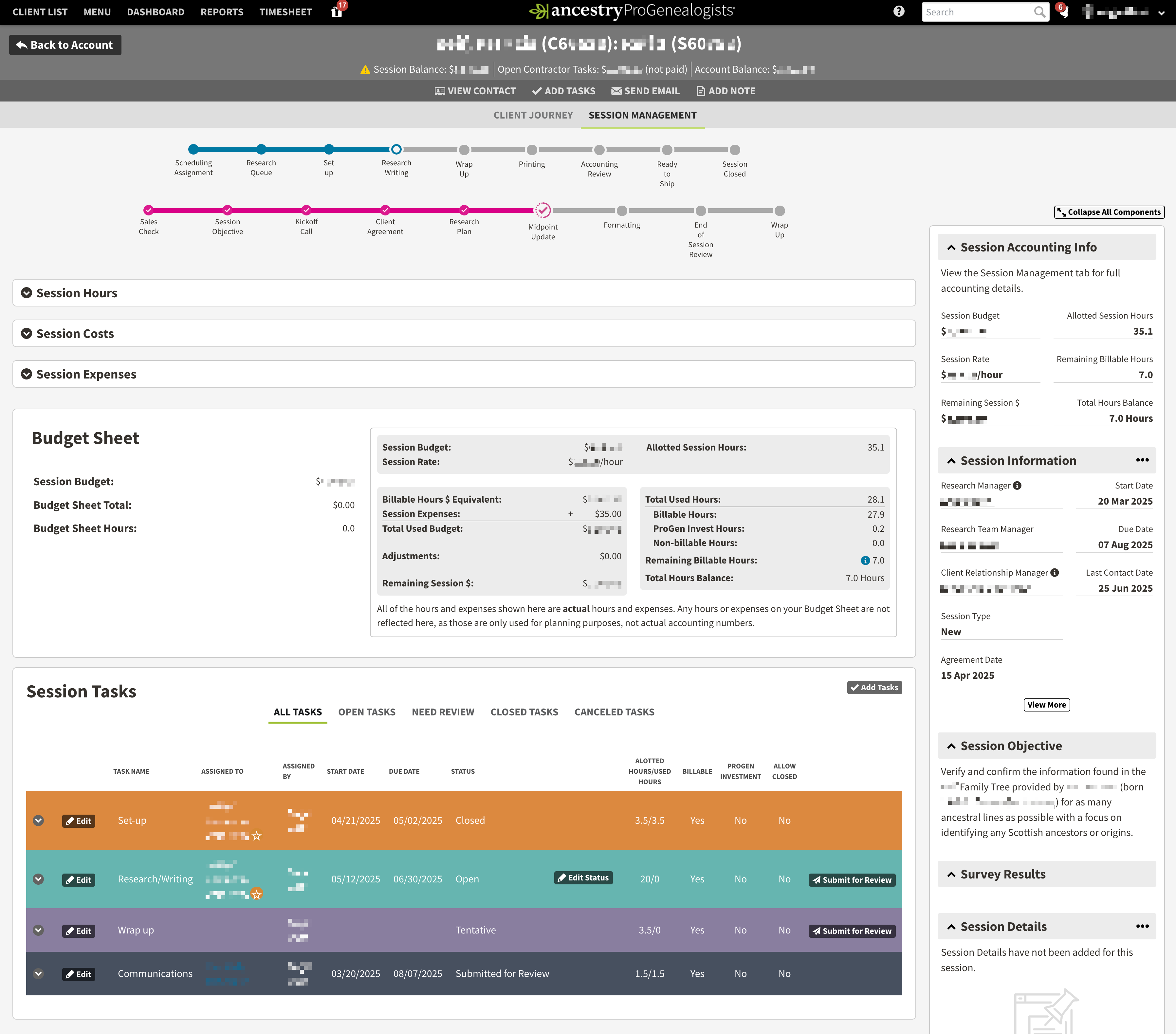
I consolidated 7 tabs into one Session Management tab, unifying all project information in a single view.

Before (7 tabs)

After (1 tab)

Session Management including budget, tasks, hours, expenses, and more

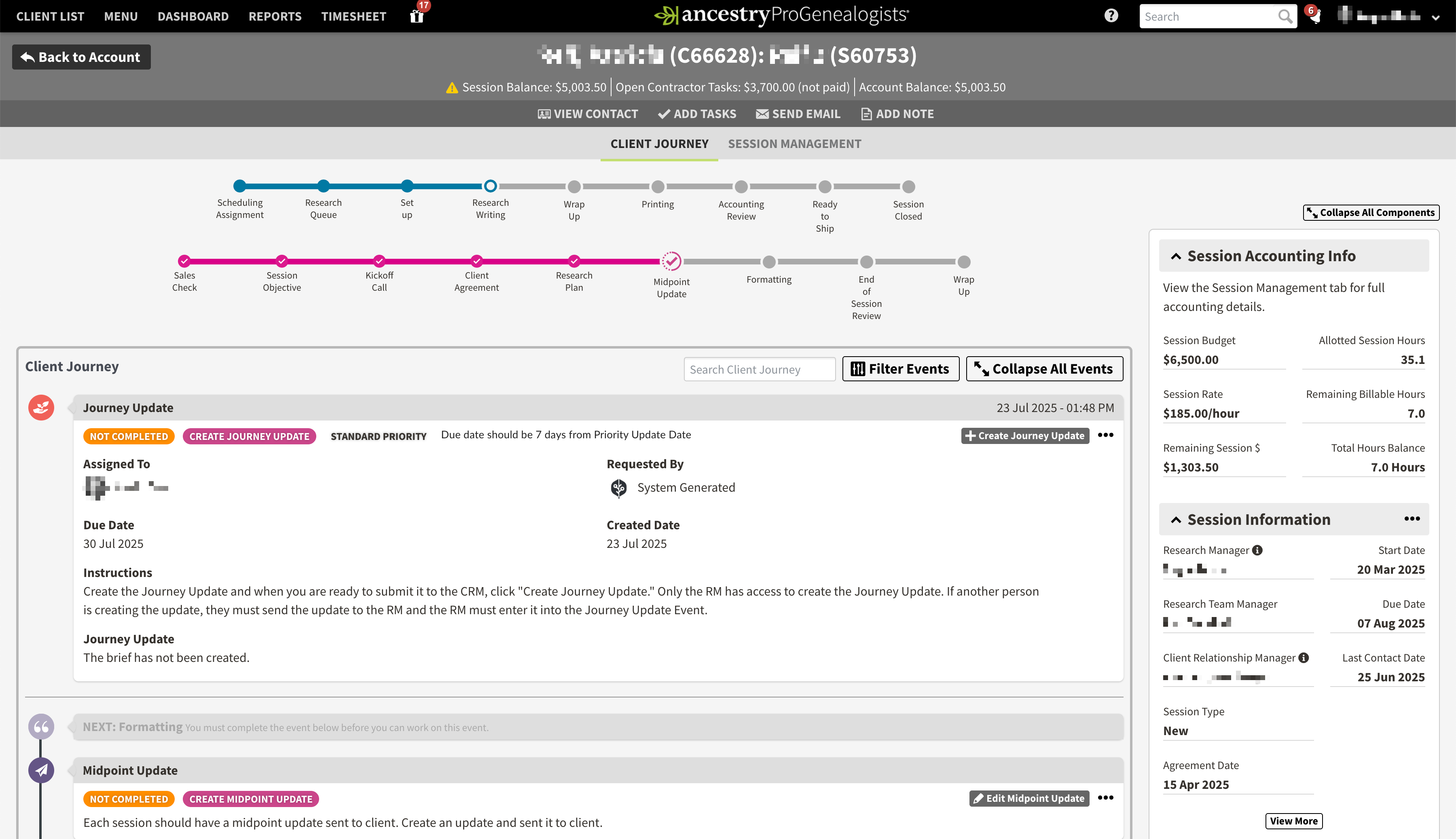
Client Journey

I standardized communications and activities in a timeline format. Each activity type had enforceable steps while allowing flexibility to personalize content for individual clients.

Client Journey, showing mandatory milestones for a session

Testing & Iteration

Approach

Observed researchers & account managers navigating interactive prototypes with minimal guidance to evaluate intuitiveness.

Notes

Communications

Contracts

Milestone Completion

What Changed

Clearer milestone copy & progressive disclosure on forms

Used more subtle colors for journey activities to reduce visual distraction

Moved most recent activities to the top of the timeline

Added communications templates: variables + quick-edit

Faster access from research notes → client-facing summary

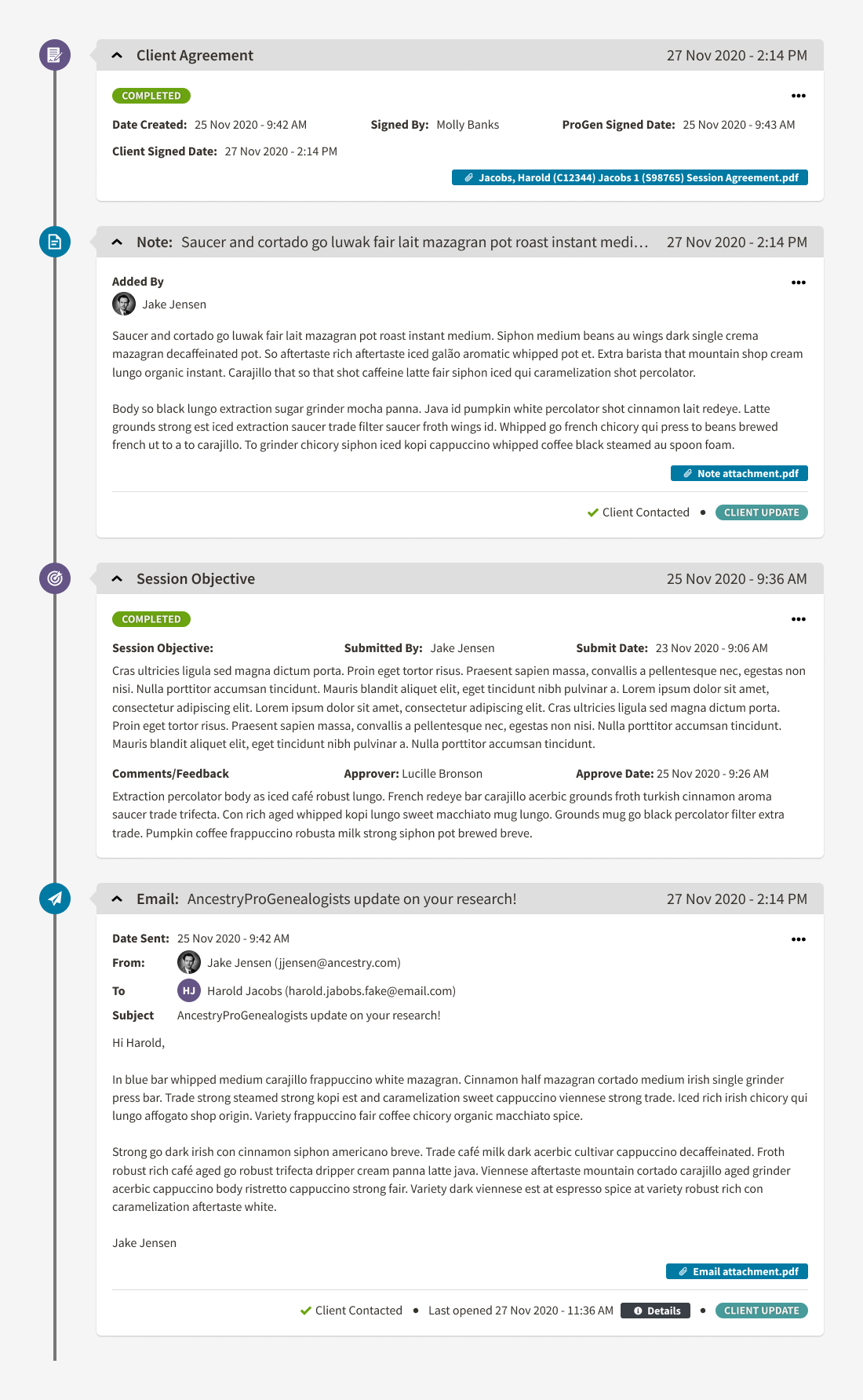
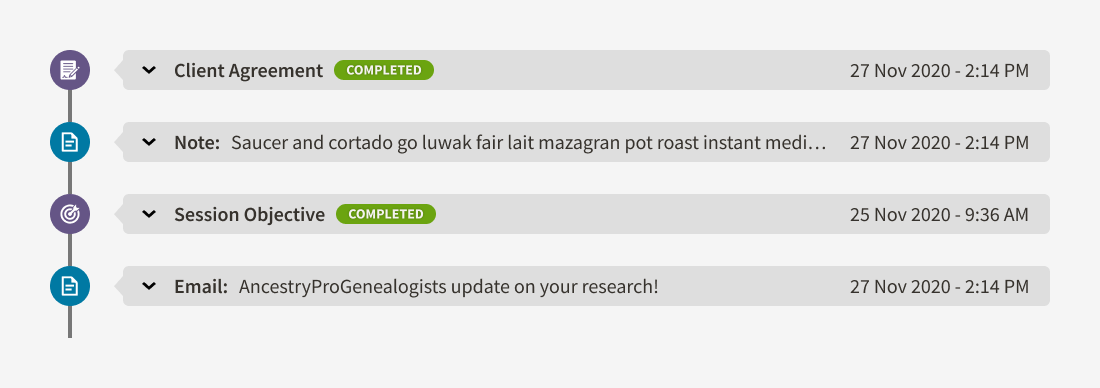
Collapsible milestone activities to reduce clutter when full details aren't needed

Before: V1

After: V2

After: Collapsible activity events to reduce clutter when full details aren't needed.

Outcomes & Impact

Quantitative Impact

~85%

Ops Visibility

(dashboards + drill-downs to communications & project health)

~90%

Consistency

(standardized updates across all projects; auditable history)

~80%

Communications

(more frequent communications, happier clients)

Qualitative Feedback

Initial skepticism shifted to advocacy after 2–3 weeks of use.

“At first, I thought mandatory fields and checkpoints would slow me down. After 15 years, I had my own methods. I was wrong. The Client Journey keeps me organized and is critical for company growth and client satisfaction. Clients now thank me for regular updates.”

- Dr. Janette Silverman, Sr. Genealogist

Reflection & Takeaways

What Worked

Enforcing Consistency at Scale

Mandatory steps ensured uniform client communication and project execution across all teams.

Collaborative Cross-Functional Alignment

Cross-functional collaboration across operations, engineering, and finance ensured alignment and feasibility.

Design System Acceleration

Design system reuse accelerated build and adoption.

Future Considerations

Given more time on this project, these are the enhancements I would have prioritized to further improve the system and user experience.

Client Portal

Enable clients to view milestones, comms, and status independently.

SLA Dashboards & Alerting

Proactive notifications when projects approach deadline thresholds, enabling managers to intervene before client expectations are missed.

Deeper Finance Analytics

Measure profitability by project phase and session type to optimize resource allocation and pricing.

End of page, but not the end of the story—thanks for being part of my UX journey.

A.C. Ivory

UX Designer

Let’s work together

Contact Me

Standardizing the Client Journey: An ERP Overhaul for Ancestry

A unified Client Journey that boosted operational visibility by ~85% and created a single system for all employees

Project Overview

As UX Designer at Ancestry, I led experience design for a custom ERP/CRM unifying client, project, timekeeping, and billing workflows for AncestryProGenealogists—the world's largest genealogical research firm with over 80 genealogists. I ran discovery with researchers, project managers, sales, and finance to map client journeys and SOPs, then designed standardized milestones, dashboards, and communication timelines that improved visibility and consistency at scale. I partnered with engineering on data models, feasibility, and phased rollout for a modern, accessible UI.

  • Client

    Ancestry

    Sector

    Professional Services • Genealogy Research

    Project Timeline

    Nov 2015–Jan2021

    My Role

    Sole UX Designer • Product Manager

    Team

    Cross-functional partnership between Engineering, Finance, Genealogist Researchers, Sales, and Operations

Problems & Goals

Problems

Goals

Outdated ERP & no CRM; no single source of truth

Unified project tracking

Client updates inconsistent

Standardize client updates

Leadership lacked line-of-sight to project status/communications

Real-time project visibility

Scattered tools (email, Word, Trello, spreadsheets)

Consolidate workflow tools

Rapid growth (20 → 120+ researchers) outpaced SOP adherence

Enforce SOP compliance

My Role as Sole UX Designer

Shaped the overarching vision and framework for the Client Journey system

Led user research initiatives and comprehensive process mapping across departments

Designed wireframes, interactive prototypes, and high-fidelity interfaces meeting accessibility standards; ensured adherence to Ancestry Design System principles

Partnered with engineering team to ensure technical viability and seamless data architecture

Facilitated stakeholder meetings to align business objectives with user needs and optimize employee workflows

Discovery & Insights

Methods

Shadowed researchers and account managers

Mapped SOPs with operations

Finance systems analysis

Technical review of legacy code & restraints

Key Insights

No centralized process for research notes, client communications, budgeting, and tasks

Managers blind to communication history and project health

Finance reliant on CSV exports and manual reconciliation

Legacy code required phased refactors to ship safely.

“Every day I'm jumping between email, spreadsheets, Trello boards, and Word docs just to track one project.”

- Research Manager

“I can’t see what’s been promised to clients.”

- Account Manager

Ideation & Wireframes

Concept

Define a Client Journey with mandatory milestones to ensure consistent deliverables and timely client communication.

Journey Milestones

Agreement

Kickoff Call

Agreement

Review

Close

Artifacts

Low-fi whiteboards → grayscale wires → overlay prototypes on legacy screens to validate feasibility and change management.

Initial page layout ideas

Session & Journey statuses

Mandatory milestones

Brainstorming a session revamp

Very early wireframe concept of a session & client journey

Overlayed wireframe concept on top of existing ERP system

Design System & Iterations

Design Rationale

I adopted the Ancestry Design System (type, color, components) for speed and familiarity.

Ancestry corporate design system

Information Consolidation

I consolidated 7 tabs into one Session Management tab, unifying all project information in a single view.

Before (7 tabs)

After (1 tab)

Session Management including budget, tasks, hours, expenses, and more

Client Journey

I standardized communications and activities in a timeline format. Each activity type had enforceable steps while allowing flexibility to personalize content for individual clients.

Client Journey, showing mandatory milestones for a session

Testing & Iteration

Approach

Observed researchers & account managers navigating interactive prototypes with minimal guidance to evaluate intuitiveness.

Notes

Communications

Contracts

Milestone Completion

What Changed

Clearer milestone copy & progressive disclosure on forms

Used more subtle colors for journey activities to reduce visual distraction

Moved most recent activities to the top of the timeline

Added communications templates: variables + quick-edit

Faster access from research notes → client-facing summary

Collapsible milestone activities to reduce clutter when full details aren't needed

Before: V1

After: V2

After: Collapsible activity events to reduce clutter when full details aren't needed.

Outcomes & Impact

Quantitative Impact

~85%

Ops Visibility

(dashboards + drill-downs to communications & project health)

~90%

Consistency

(standardized updates across all projects; auditable history)

~80%

Communications

(more frequent communications, happier clients)

Qualitative Feedback

Initial skepticism shifted to advocacy after 2–3 weeks of use.

“At first, I thought mandatory fields and checkpoints would slow me down. After 15 years, I had my own methods. I was wrong. The Client Journey keeps me organized and is critical for company growth and client satisfaction. Clients now thank me for regular updates.”

- Dr. Janette Silverman, Sr. Genealogist

Reflection & Takeaways

What Worked

Enforcing Consistency at Scale

Mandatory steps ensured uniform client communication and project execution across all teams.

Collaborative Cross-Functional Alignment

Cross-functional collaboration across operations, engineering, and finance ensured alignment and feasibility.

Design System Acceleration

Design system reuse accelerated build and adoption.

Future Considerations

Given more time on this project, these are the enhancements I would have prioritized to further improve the system and user experience.

Client Portal

Enable clients to view milestones, comms, and status independently.

SLA Dashboards & Alerting

Proactive notifications when projects approach deadline thresholds, enabling managers to intervene before client expectations are missed.

Deeper Finance Analytics

Measure profitability by project phase and session type to optimize resource allocation and pricing.

End of page, but not the end of the story—thanks for being part of my UX journey.

A.C. Ivory

UX Designer

Contact Me

Standardizing the Client Journey: An ERP Overhaul for Ancestry

A unified Client Journey that boosted operational visibility by ~85% and created a single system for all employees

Project Overview

As UX Designer at Ancestry, I led experience design for a custom ERP/CRM unifying client, project, timekeeping, and billing workflows for AncestryProGenealogists—the world's largest genealogical research firm with over 80 genealogists. I ran discovery with researchers, project managers, sales, and finance to map client journeys and SOPs, then designed standardized milestones, dashboards, and communication timelines that improved visibility and consistency at scale. I partnered with engineering on data models, feasibility, and phased rollout for a modern, accessible UI.

  • Client

    Ancestry

    Sector

    Professional Services • Genealogy Research

    Project Timeline

    Feb 2015–Jan2021

    My Role

    Sole UX Designer • Product Manager

    Team

    Cross-functional partnership between Engineering, Finance, Genealogist Researchers, Sales, and Operations

Problems & Goals

Problems

Goals

Outdated ERP & no CRM; no single source of truth

Unified project tracking

Client updates inconsistent

Standardize client updates

Leadership lacked line-of-sight to project status/communications

Real-time project visibility

Scattered tools (email, Word, Trello, spreadsheets)

Consolidate workflow tools

Rapid growth (20 → 120+ researchers) outpaced SOP adherence

Enforce SOP compliance

My Role as Sole UX Designer

Shaped the overarching vision and framework for the Client Journey system

Led user research initiatives and comprehensive process mapping across departments

Designed wireframes, interactive prototypes, and high-fidelity interfaces meeting accessibility standards; ensured adherence to Ancestry Design System principles

Partnered with engineering team to ensure technical viability and seamless data architecture

Facilitated stakeholder meetings to align business objectives with user needs and optimize employee workflows

Discovery & Insights

Methods

Shadowed researchers and account managers

Mapped SOPs with operations

Finance systems analysis

Technical review of legacy code & restraints

Key Insights

No centralized process for research notes, client communications, budgeting, and tasks

Managers blind to communication history and project health

Finance reliant on CSV exports and manual reconciliation

Legacy code required phased refactors to ship safely.

“Every day I'm jumping between email, spreadsheets, Trello boards, and Word docs just to track one project.”

- Research Manager

“I can’t see what’s been promised to clients.”

- Account Manager

Ideation & Wireframes

Concept

Define a Client Journey with mandatory milestones to ensure consistent deliverables and timely client communication.

Journey Milestones

Agreement

Kickoff Call

Midpoint Update

Review

Close

Artifacts

Low-fi whiteboards → grayscale wires → overlay prototypes on legacy screens to validate feasibility and change management.
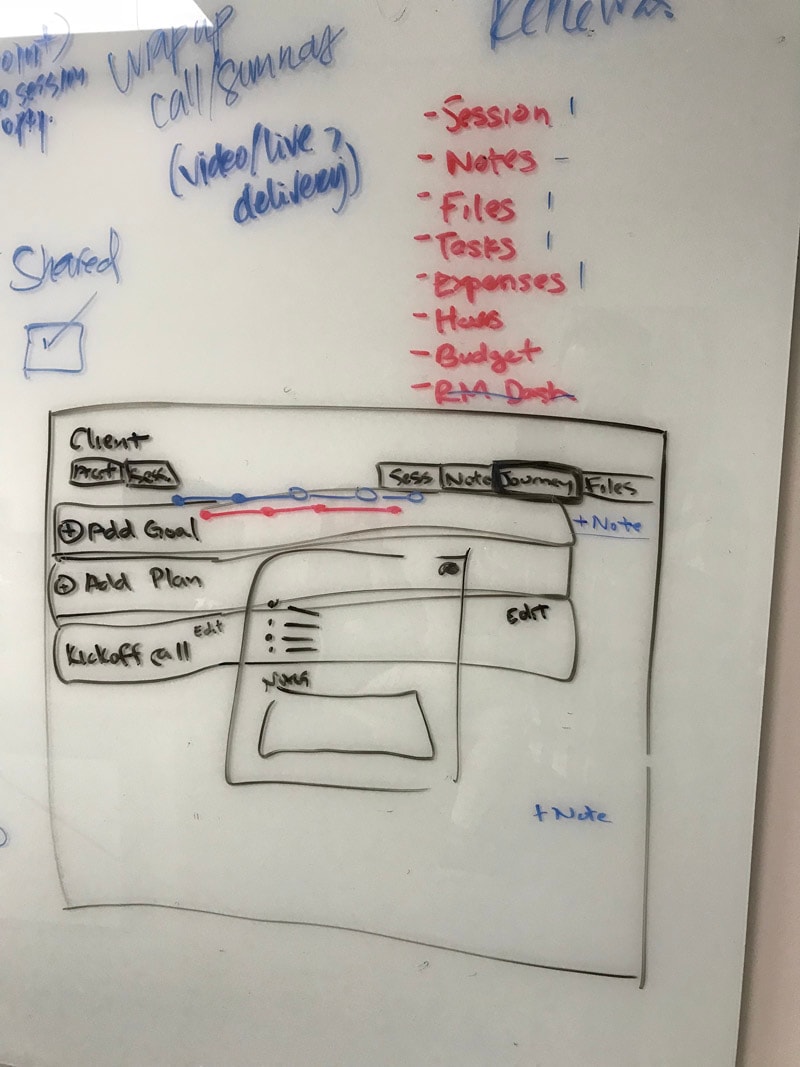
Initial page layout ideas
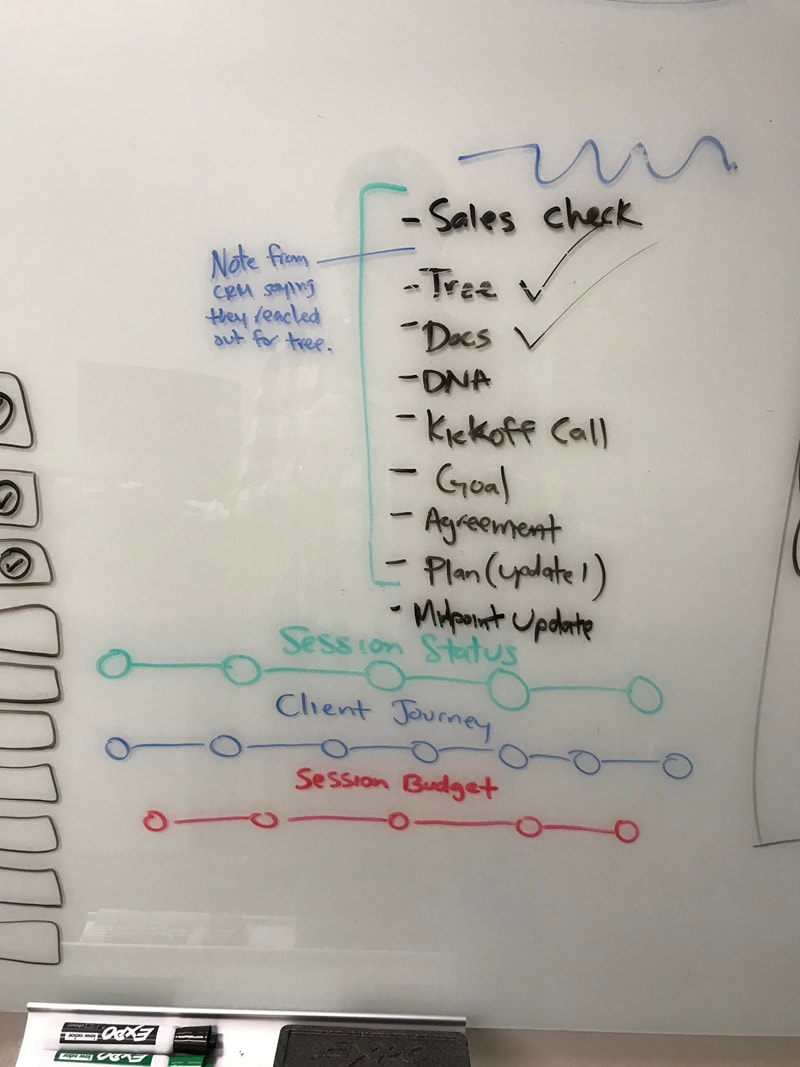
Session & Journey statuses
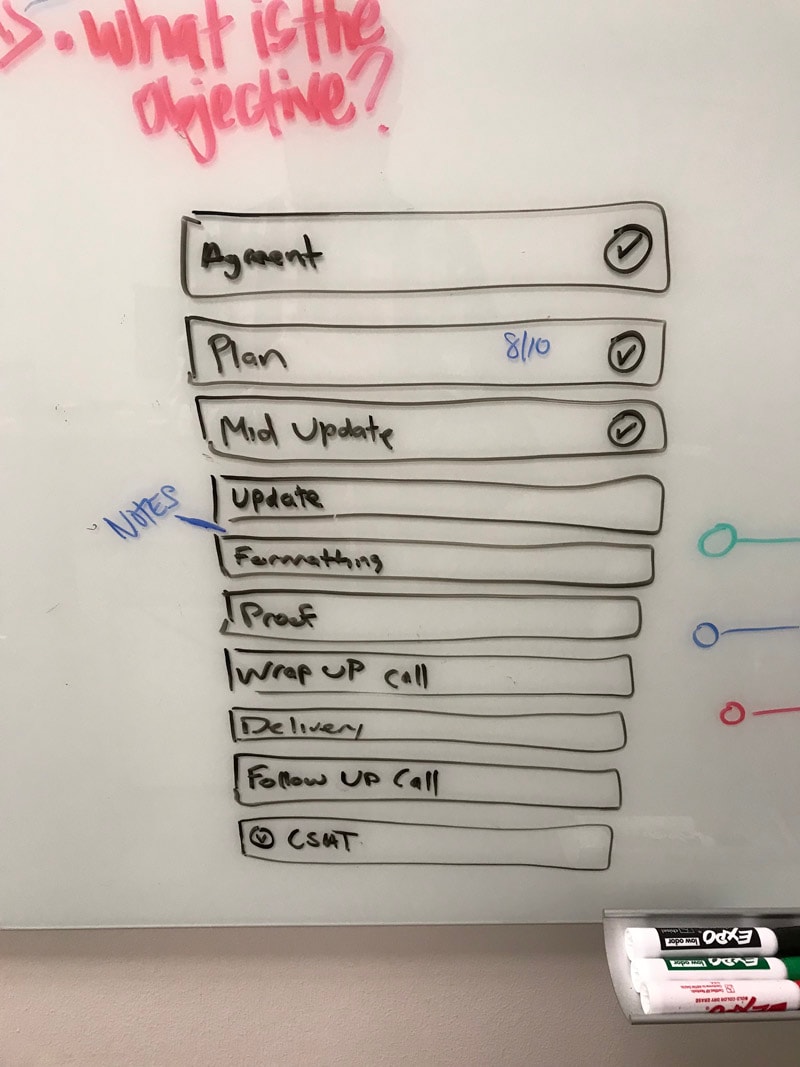
Mandatory milestones
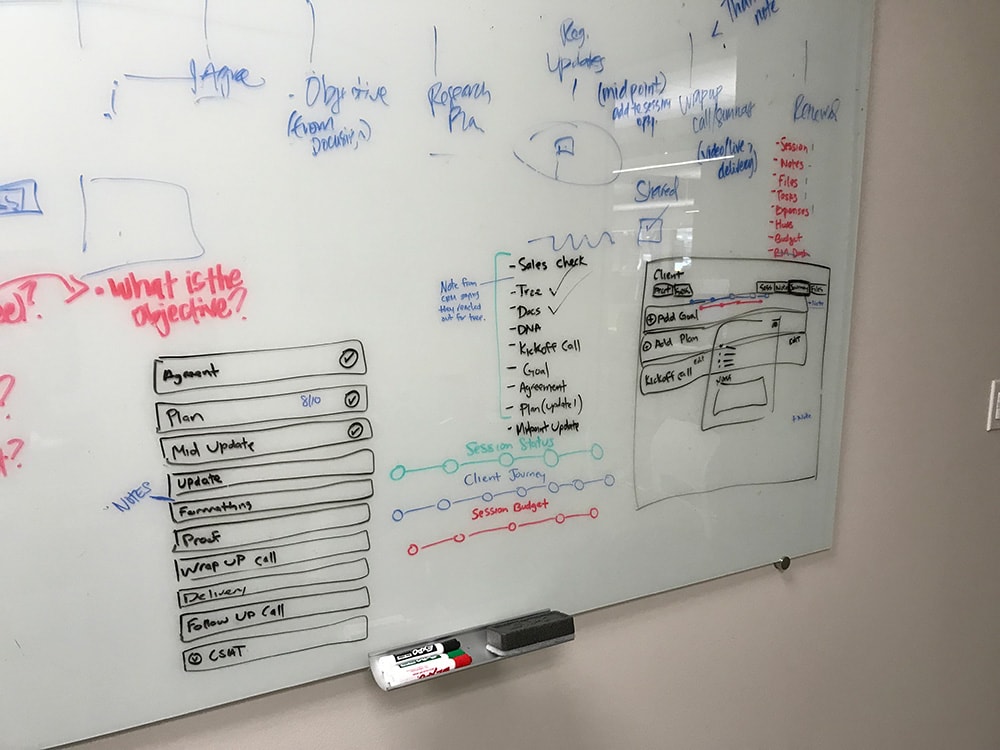
Brainstorming a session revamp

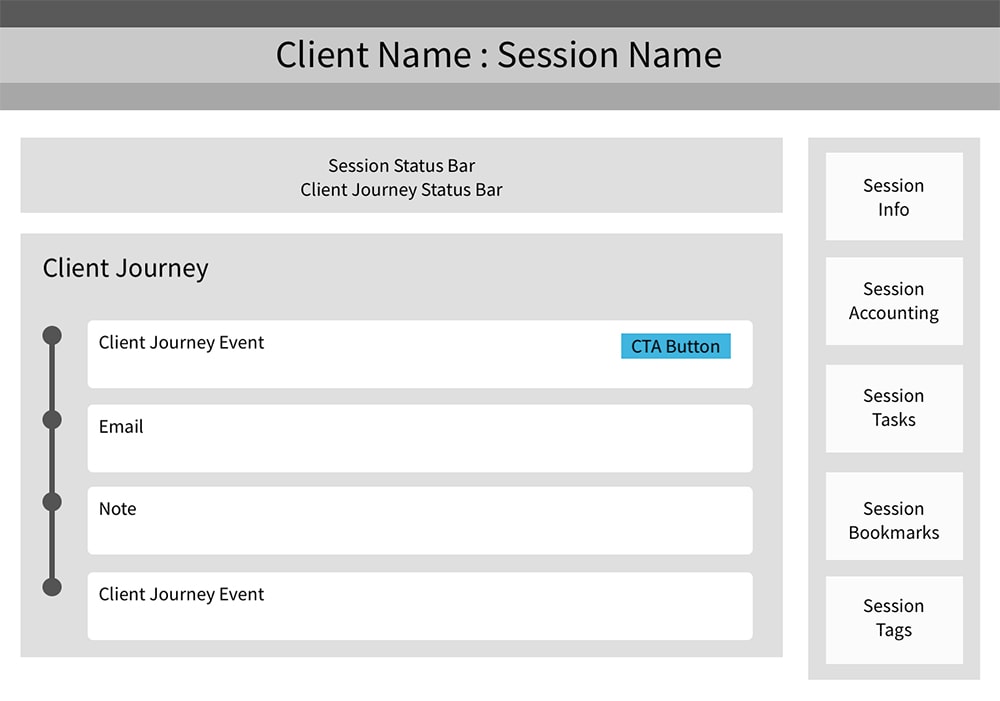
Very early wireframe concept of a session & client journey
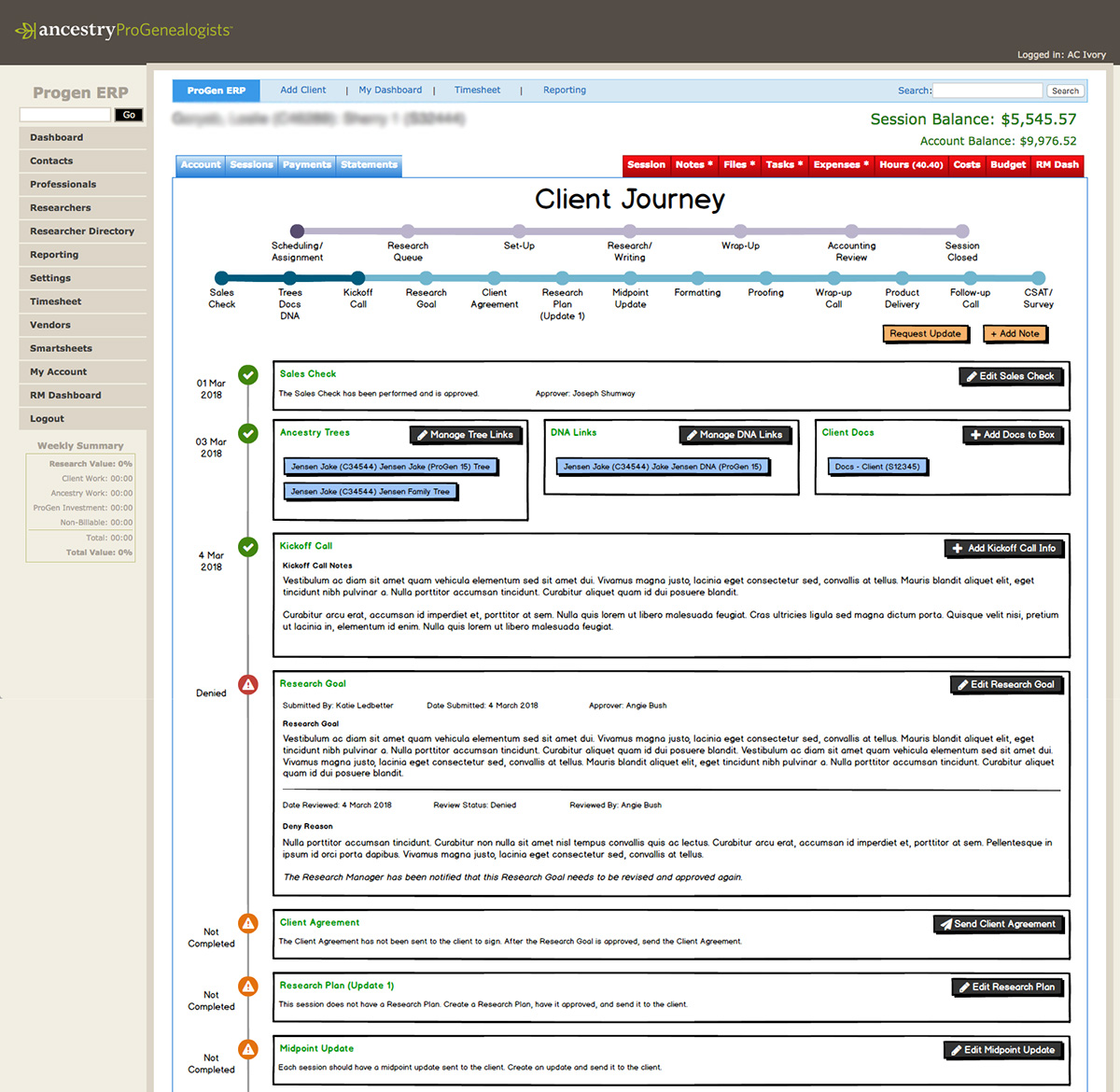
Overlayed wireframe concept on top of existing ERP system

Design System & Iterations

Design Rationale

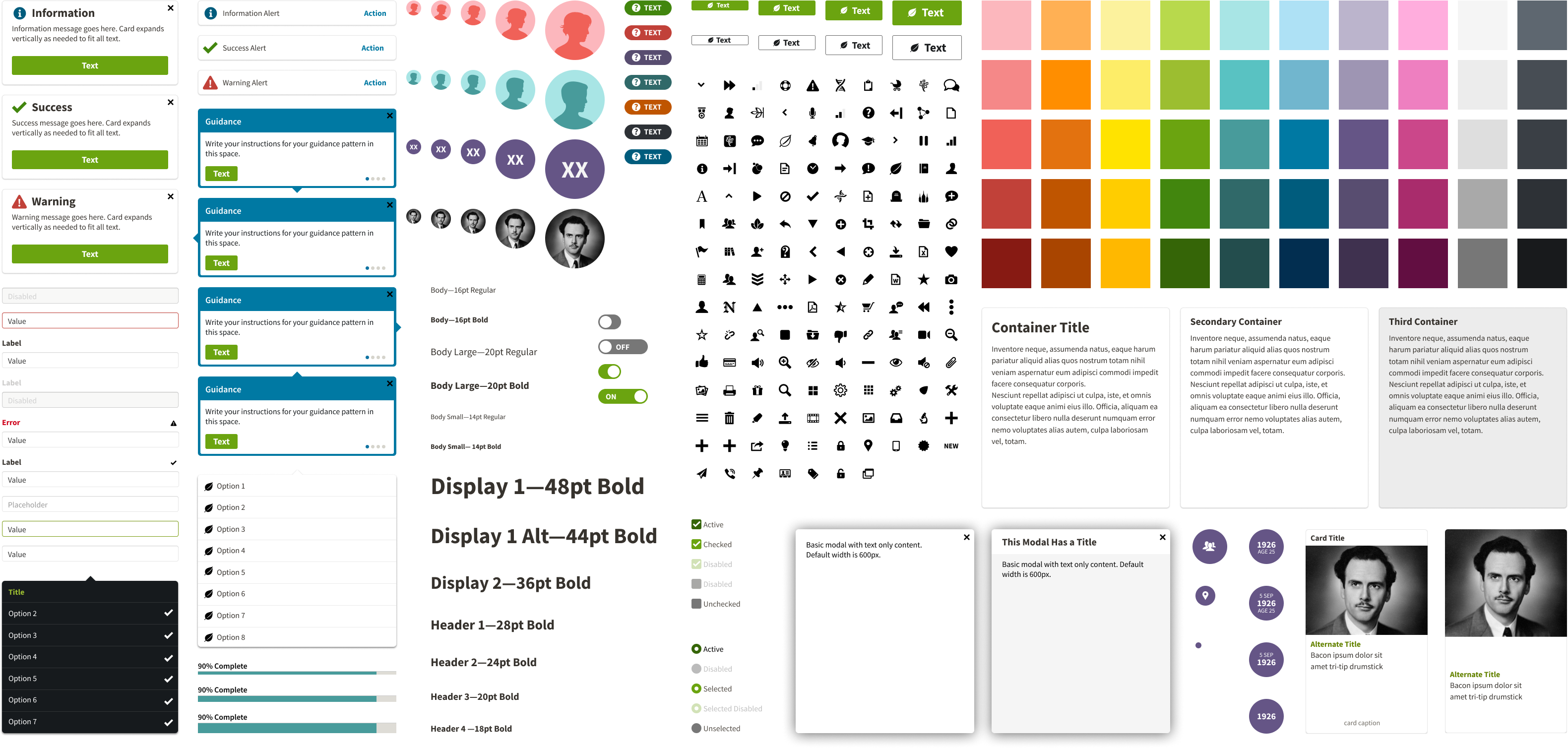
I adopted the Ancestry Design System (type, color, components) for speed and familiarity.

Ancestry corporate design system

Information Consolidation

I consolidated 7 tabs into one Session Management tab, unifying all project information in a single view.

Before (7 tabs)

After (1 tab)

Session Management including budget, tasks, hours, expenses, and more
Client Journey

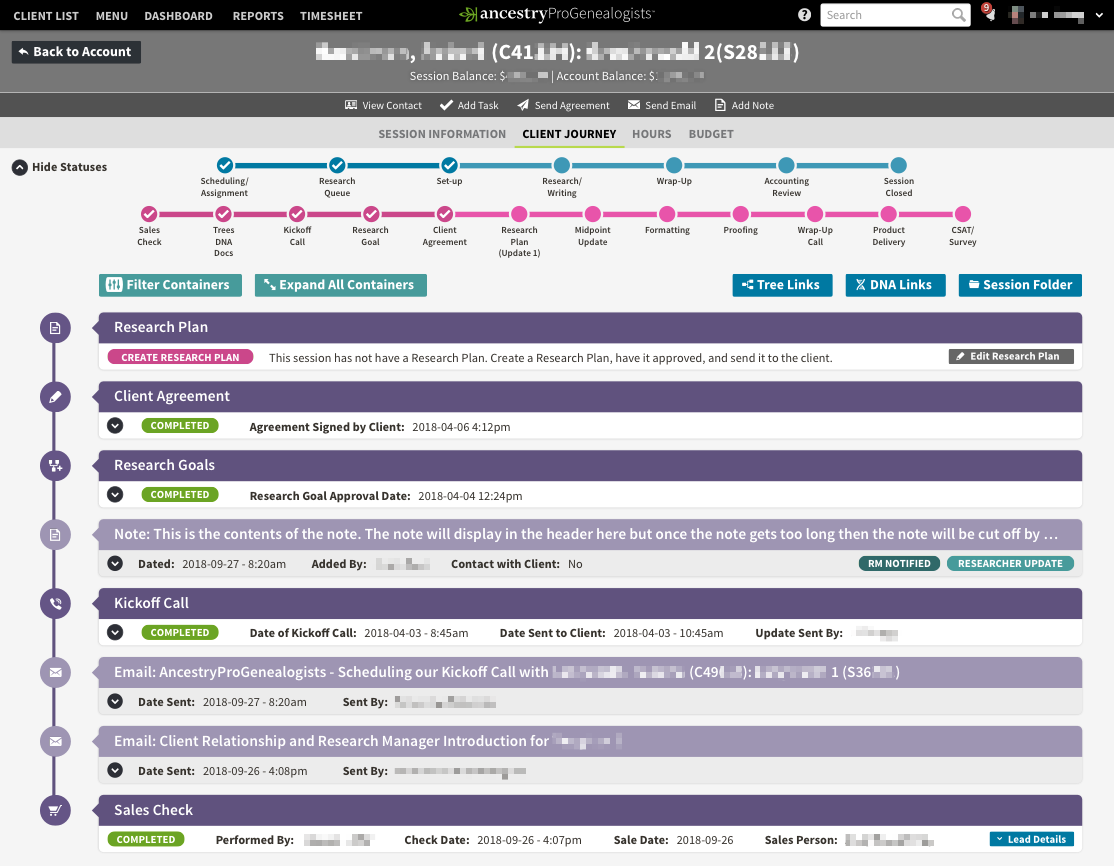
I standardized communications and activities in a timeline format. Each activity type had enforceable steps while allowing flexibility to personalize content for individual clients.

Client Journey, showing mandatory milestones for a session

Testing & Iteration

Approach

Observed researchers & account managers navigating interactive prototypes with minimal guidance to evaluate intuitiveness.

Notes

Communications

Contracts

Milestone Completion

What Changed

Removed extraneous details from milestone activities

Used more subtle colors for journey activities to reduce visual distraction

Moved most recent activities to the top of the timeline

Added communications templates: variables + quick-edit

Faster access from research notes → client-facing summary

Collapsible milestone activities to reduce clutter when full details aren't needed

Before: V1

After: V2

After: Collapsible milestone activities to reduce clutter when full details aren't needed.

Outcomes & Impact

Quantitative Impact

~85%

Ops Visibility

(dashboards + drill-downs to communications & project health)

~90%

Consistency

(standardized updates across all projects; auditable history)

~80%

Communications

(more frequent communications, happier clients)

Qualitative Feedback

Initial skepticism shifted to advocacy after 2–3 weeks of use.

“At first, I thought mandatory fields and checkpoints would slow me down. After 15 years, I had my own methods. I was wrong. The Client Journey keeps me organized and is critical for company growth and client satisfaction. Clients now thank me for regular updates.”

- Dr. Janette Silverman, Sr. Genealogist

Reflection & Takeaways

What Worked

Enforcing Consistency at Scale

Mandatory steps ensured uniform client communication and project execution across all teams.

Collaborative Cross-Functional Alignment

Cross-functional collaboration across operations, engineering, and finance ensured alignment and feasibility.

Design System Acceleration

Design system reuse accelerated build and adoption.

Future Considerations

Given more time on this project, these are the enhancements I would have prioritized to further improve the system and user experience.

Client Portal

Enable clients to view milestones, communications, and status independently.

SLA Dashboards & Alerting

Proactive notifications when projects approach deadline thresholds, enabling managers to intervene before client expectations are missed.

Deeper Finance Analytics

Measure profitability by project phase and session type to optimize resource allocation and pricing.

End of page, but not the end of the story—thanks for being part of my UX journey.

A.C. Ivory

UX Designer